Integrations

Connect Shopmonkey in minutes.

Authorize the connection and your customers, vehicles, repair orders, invoices, payments, services, parts, and workflow statuses sync into VehicleDesk. Webhooks plus continuous polling keep every record current. Shopmonkey stays the system of record. VehicleDesk runs the day.

System of record

Shopmonkey stays the system of record. VehicleDesk runs the day.

Connected shop management system

Connected systems

Shopmonkey, connected and current.

Search the connection by record type or sync method, then open the detail for what syncs, how fresh it is, and where each record lives.

Availability
Sync method

1 verified data connection

AvailableContinuous pollingSigned webhooks

Shopmonkey

Customers, vehicles, repair orders, invoices, payments, services, parts, and workflow statuses sync from Shopmonkey into VehicleDesk and power the board, Today, follow-ups, parts costs, and reporting.

CustomersVehiclesServices, parts, labor, and tiresInvoicesPaymentsEstimatesRepair ordersInspections
Direction
Shopmonkey into VehicleDesk through the official API and signed webhooks
Freshness
Webhooks plus continuous polling, with manual sync on demand
Setup
Your shop administrator, with VehicleDesk onboarding
System of record
Shopmonkey keeps repair and financial records. VehicleDesk runs the day.
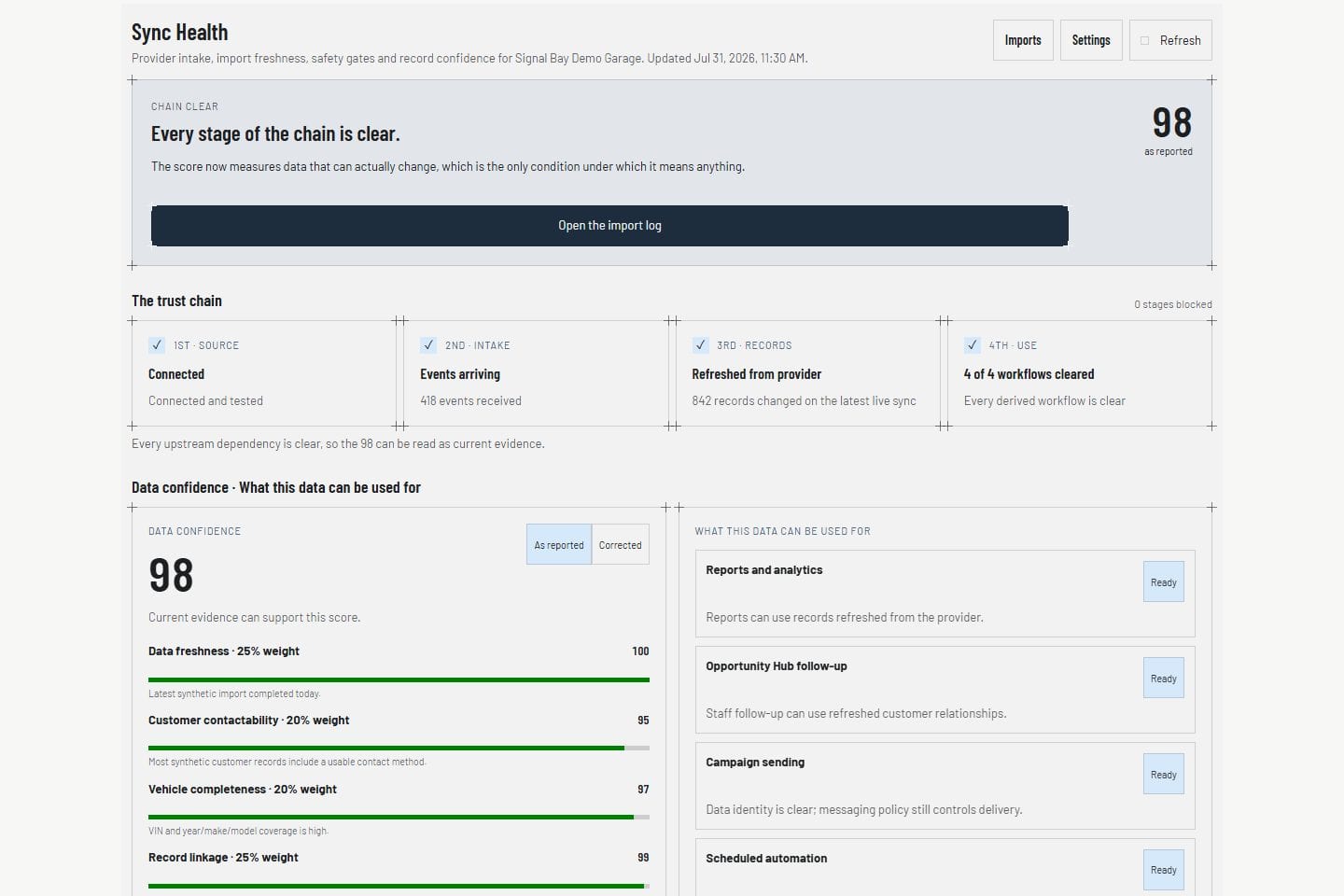
VehicleDesk Sync Health showing Shopmonkey webhook, quota, and import state, shown with demo data
Product screens shown with demo data.

What syncs

The shop record lands in the screens that run the day.

Customers, vehicles, and repair history power the customer profile. Repair orders, invoices, and payments power the board and the weekly close. Appointments are created and confirmed in VehicleDesk on that same customer and vehicle context.

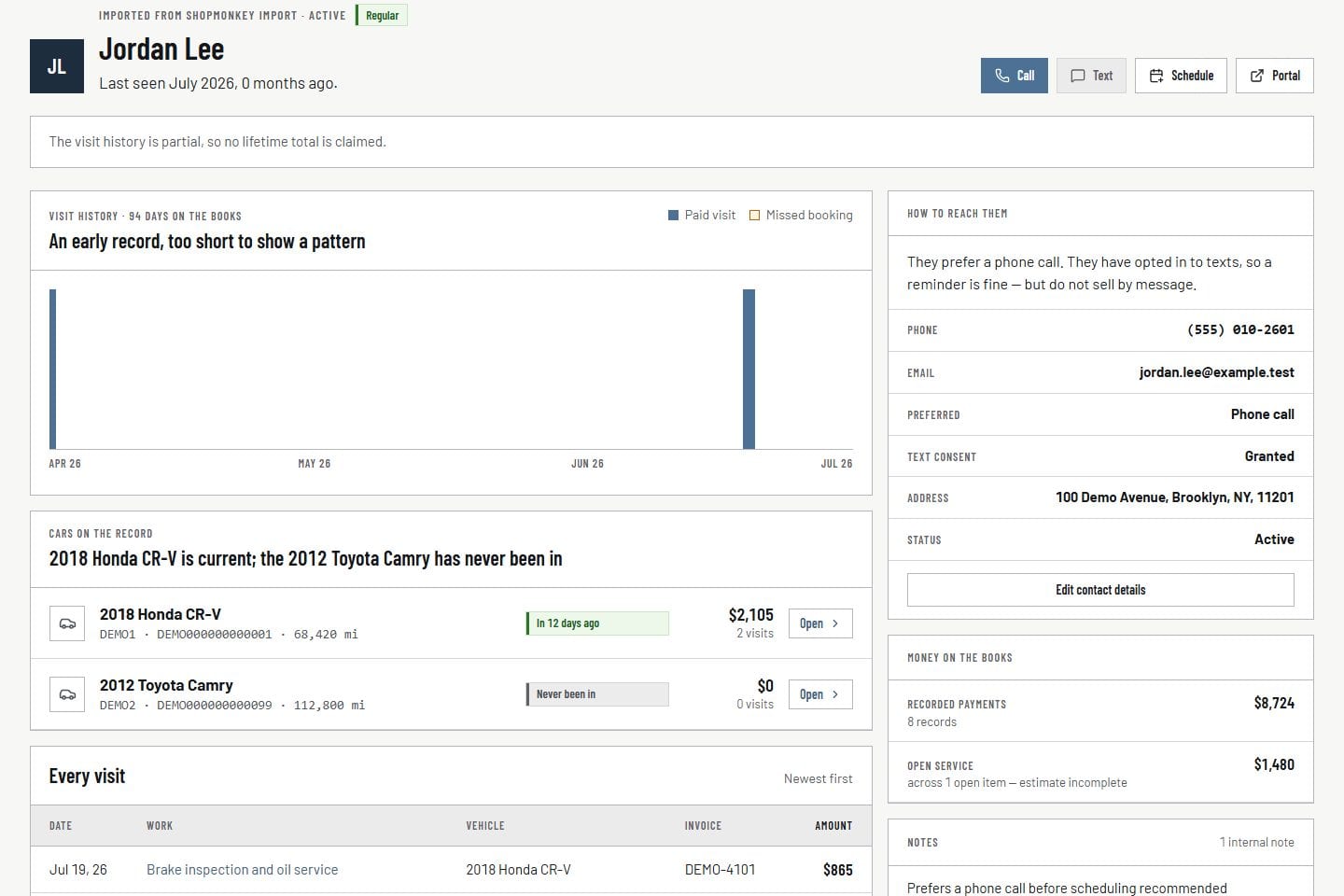
Customers and vehicles

The relationship arrives with the repair history.

Customers, vehicles, and every service line sync from Shopmonkey. Advisors open the full relationship in VehicleDesk instead of rebuilding it from separate lists.

  • Customers
  • Vehicles
  • Services, parts, labor, and tires
VehicleDesk customer profile with a Shopmonkey import record and synthetic relationship history
Product screens shown with demo data.

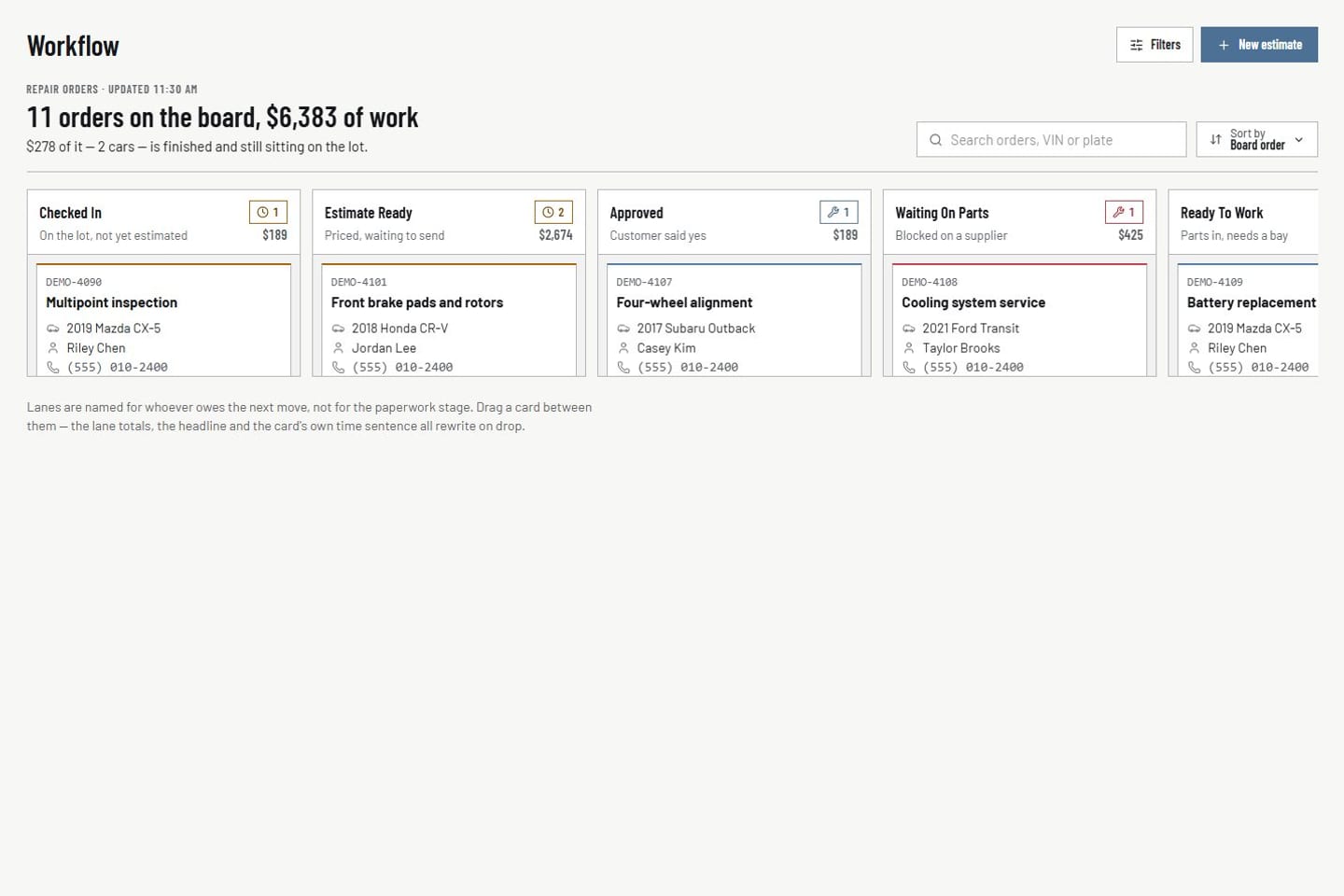
Repair orders and money

Repair orders, invoices, and payments stay tied to the job.

Repair orders, estimates, invoices, and payments sync into VehicleDesk. The board shows the job and what was billed. Shopmonkey stays the system of record for those records.

  • Repair orders
  • Estimates
  • Invoices
  • Payments
VehicleDesk repair-order board showing imported shop work with synthetic demo jobs
Product screens shown with demo data.

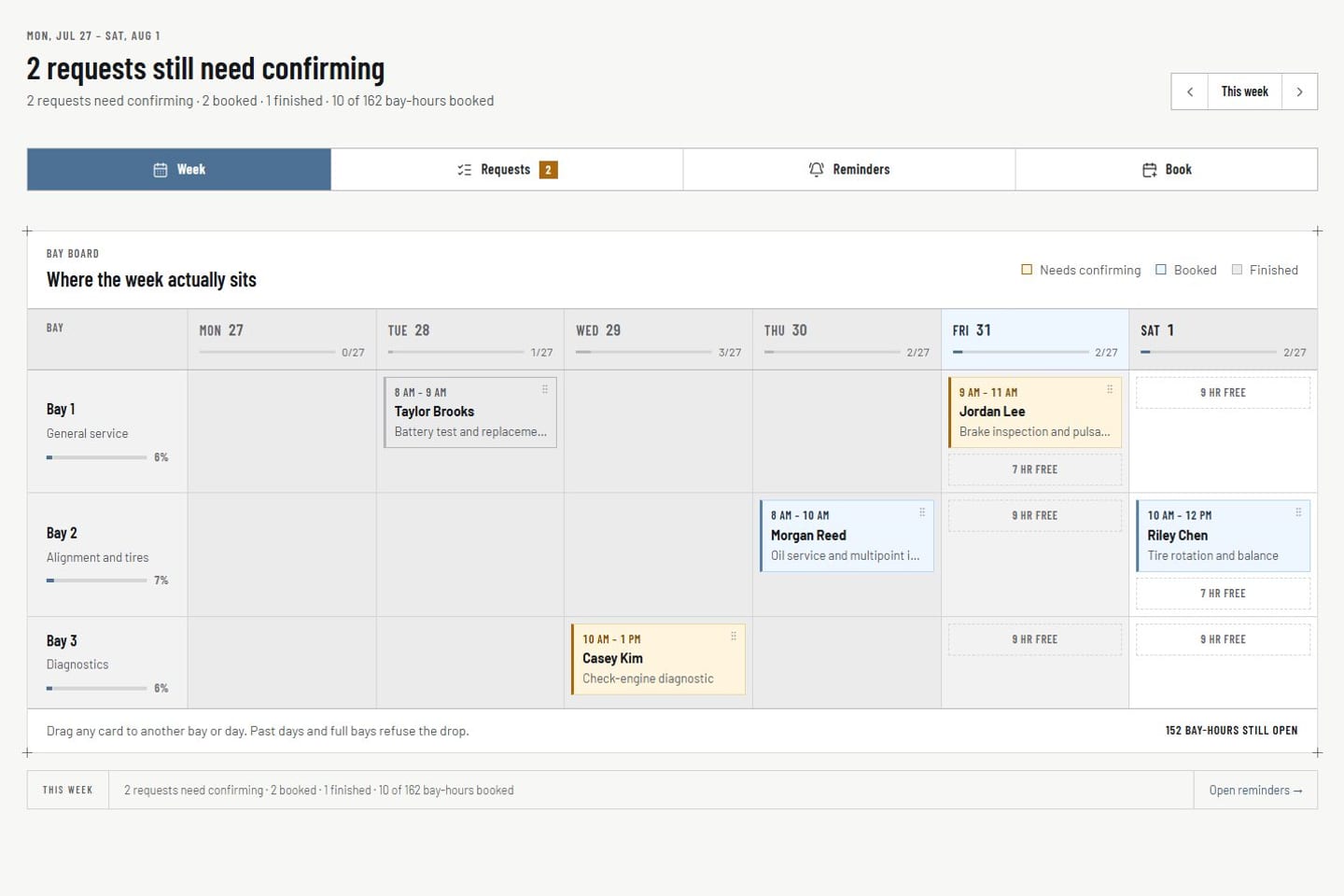
Appointments

Appointments are booked and confirmed in VehicleDesk.

Request-to-book and internal scheduling run in VehicleDesk. Staff match the synced customer and vehicle, check capacity, and confirm the day.

  • Request-to-book and internal scheduling
  • Synced customer and vehicle matching
  • Confirmed work flows to Today
VehicleDesk appointments week board with synthetic request, schedule, and open bay time
Product screens shown with demo data.

Where each record lives

Shopmonkey stays the system of record. VehicleDesk runs the day.

The connection syncs supported records into VehicleDesk. Shopmonkey keeps the repair and financial records. VehicleDesk runs the staff workflow on the synced copy.

System of record and the shop's day

System of record

Shopmonkey keeps the repair record.

Shopmonkey keeps the repair and financial records for the shop.

  • Customers and vehicles
  • Services, parts, estimates, and repair orders
  • Invoices and payments
  • Workflow statuses
Open the Shopmonkey connection

The shop's day

VehicleDesk runs the shop's day on it.

Synced context powers the board, queues, notes, tasks, appointments, follow-ups, and consent-checked messaging.

  • Appointments and request-to-book
  • Follow-ups, notes, tasks, and reminders
  • Consent-checked messaging
  • Deferred work and parts costs
  • Sync Health freshness

Shopmonkey sync coverage

CapabilityWhat syncs into VehicleDeskSystem of record
CustomersImported customer record with contact details and historyShopmonkey source customer
VehiclesImported vehicle record with year, make, model, and mileageShopmonkey source vehicle
Services, parts, labor, and tiresImported from the order service endpoint, including parts, labor, and tiresShopmonkey source order lines
EstimatesImported estimate status and number on the repair orderShopmonkey source estimate
InvoicesImported invoice record with billed totalsShopmonkey source invoice
PaymentsImported payment record, live through webhooksShopmonkey source payment
InspectionsImported signed-event snapshots; not a full historical pullShopmonkey source inspection
AppointmentsCreated in VehicleDeskVehicleDesk local scheduling and request-to-book
Repair ordersImported repair-order context and workflow statusShopmonkey source repair order
Follow-up notes and tasksCreated in VehicleDeskVehicleDesk local state
Staff workflowCreated in VehicleDesk: notes, tasks, reminders, deferred and opportunity stateShopmonkey is not the operator of local recovery
CredentialsEncrypted server-side; never shown as proofProvider-owned secrets
Sync HealthFreshness, quota, and failure evidenceVehicleDesk operational record

How the connection runs

Authorize, sync, work, and watch it stay current.

The connection runs on the official Shopmonkey API plus signed webhooks. Sync Health shows freshness at a glance.

  1. 01

    Authorize the connection

    A shop administrator authorizes Shopmonkey access from VehicleDesk. The API credential is encrypted server-side and never leaves it.

  2. 02

    Sync the history

    Continuous polling and signed webhooks bring customers, vehicles, repair orders, invoices, payments, services, parts, and workflow statuses into the shop's tenant. Manual sync is one click.

  3. 03

    Run the day on the synced record

    Queues, boards, notes, tasks, and follow-ups run on that context. Shopmonkey keeps the repair and financial records.

  4. 04

    Watch freshness in Sync Health

    Sync Health shows the last successful sync, webhook state, and quota, so you always know the numbers are current.

Also connected

Google Business Profile, email, and SMS run inside VehicleDesk.

Reviews, texts, and emails work from the same synced customer record.

Google Business Profile

Reviews arrive in VehicleDesk. Staff triage and reply from the review queue with the customer and their last visit beside each one. Replies publish to your Google Business Profile.

See reputation

SMS

Text customers from the record. Every message is consent-checked before it sends, and the reply lands on the same thread.

See communications

Email

Send service reminders and follow-ups by email from the same customer record. Consent and suppression are checked on every send.

See communications

Book a demo

See the Shopmonkey connection live.

Bring your Shopmonkey questions. We show the sync, the board it powers, and how the week closes.