Shopmonkey integration

Connect Shopmonkey in minutes.

Authorize the connection and customers, vehicles, repair orders, invoices, payments, services, parts, and workflow statuses sync into VehicleDesk. Webhooks plus continuous polling keep every record current. Shopmonkey stays the system of record. VehicleDesk runs the day.

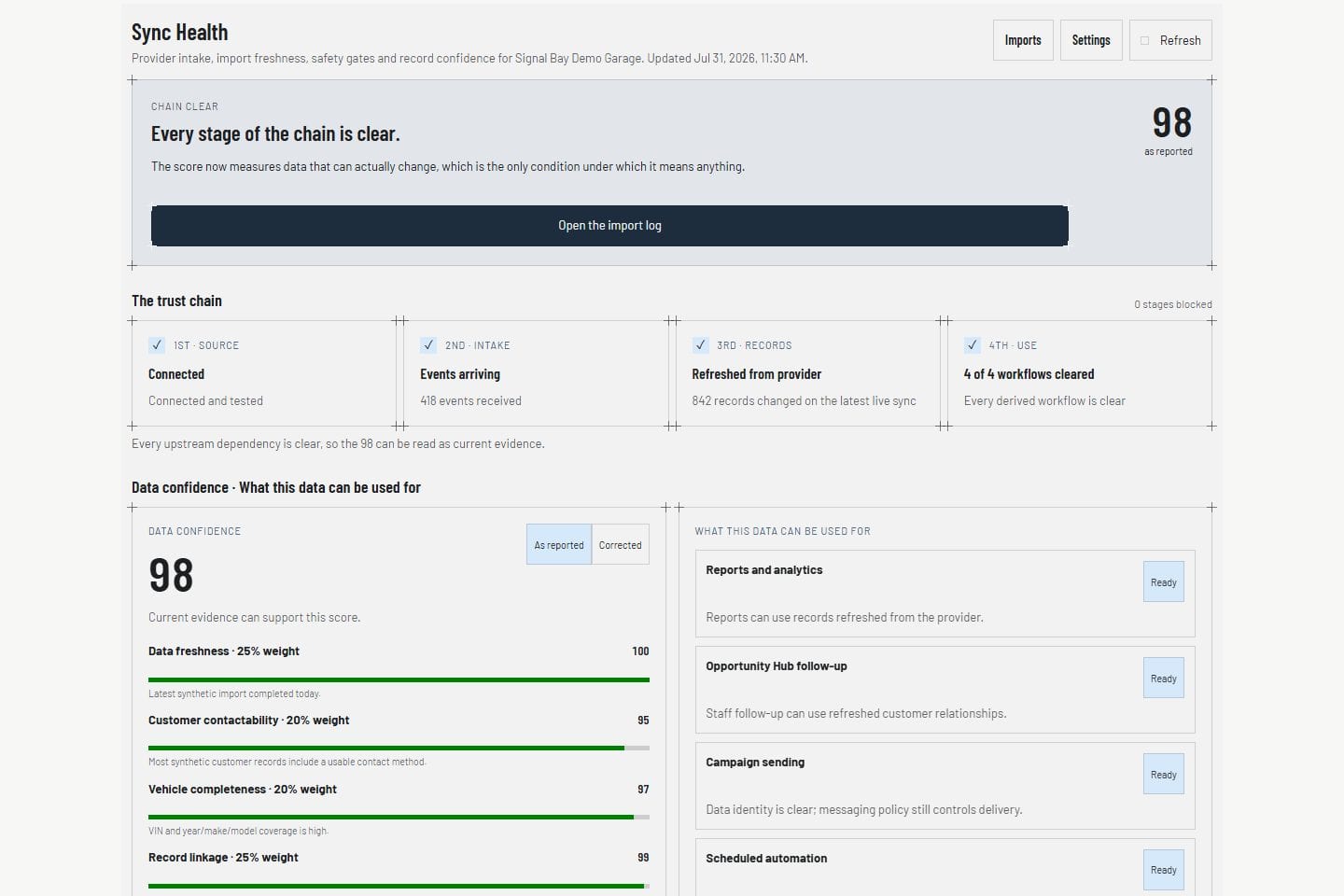
Sync Health · Product screens shown with demo data.
VehicleDesk Sync Health with synthetic Shopmonkey provider, webhook, and quota state

One connection. The whole shop's history in VehicleDesk, current all day.

Data flow

From Shopmonkey to the shop floor, continuously.

Shopmonkey records move through the official API and signed webhooks into the shop's own VehicleDesk tenant, then into the screens staff run all day.

ShopmonkeySystem of recordAPI and webhooksContinuous polling, signed eventsVehicleDeskYour shop's tenant, always currentThe shop's dayBoard, follow-ups, parts, close

Customers, vehicles, repair orders, invoices, payments, services, parts, and workflow statuses sync through the official Shopmonkey API and signed webhooks into the shop's tenant. Webhooks plus continuous polling keep every record current.

API originOfficial Shopmonkey v3api.shopmonkey.cloud/v3
FreshnessWebhooks plus pollingEvery record current all day
System of recordShopmonkeyVehicleDesk runs the day

In the product

Synced records show up where the work happens.

Customer profiles, the repair-order board, and parts costs all run on synced Shopmonkey records.

Customers

Customers and vehicles land as complete relationships.

Staff open the customer and every vehicle, service line, and payment VehicleDesk synced from Shopmonkey. The Shopmonkey ID keeps every record linked.

  • Customers and vehicles linked by stable Shopmonkey IDs
  • Service and payment history beside the relationship
  • Contact details and consent ready for the next call
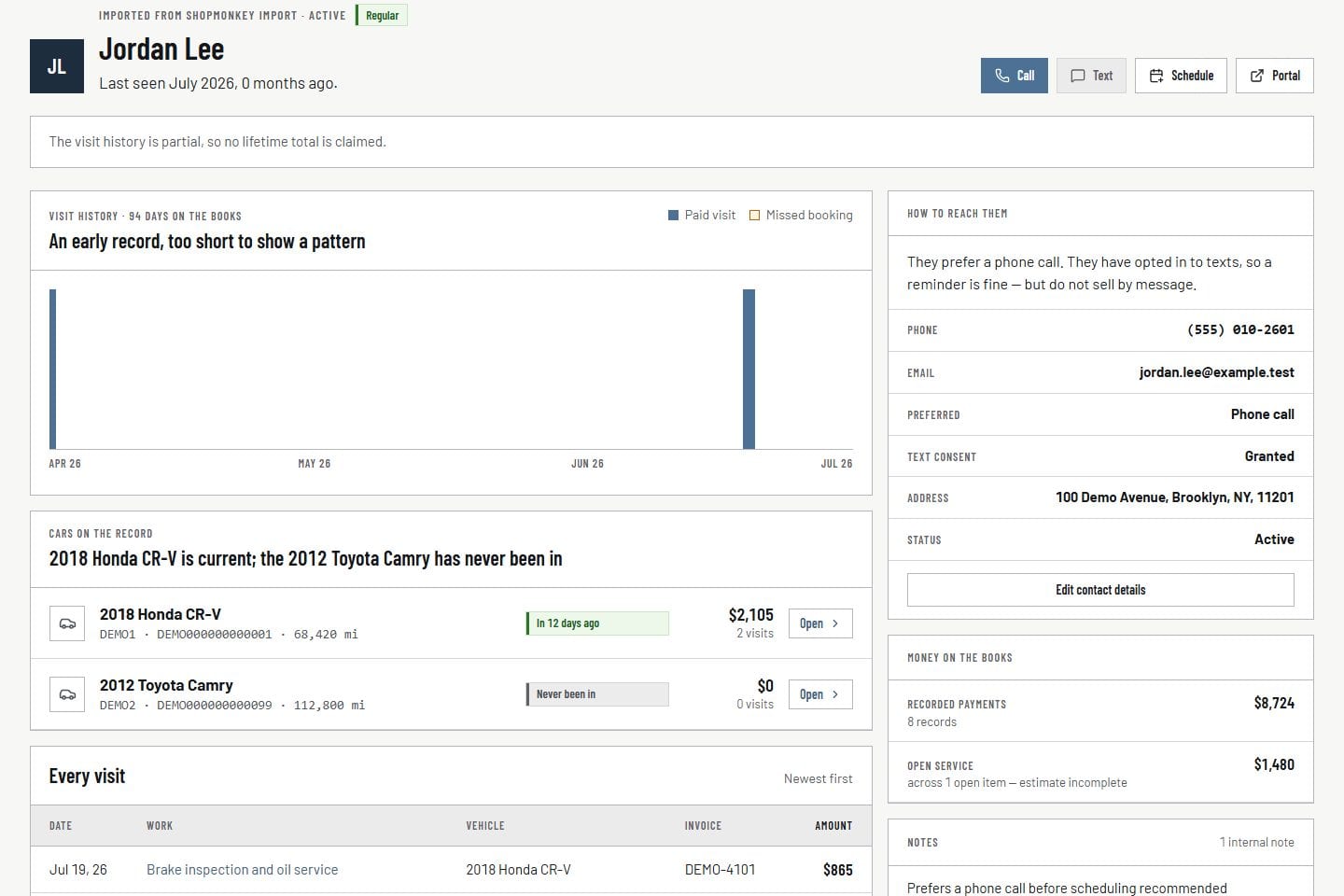
Customer relationship · Product screens shown with demo data.
VehicleDesk customer relationship workspace rendered with a synthetic customer record

Repair orders

Run active repair orders from one board.

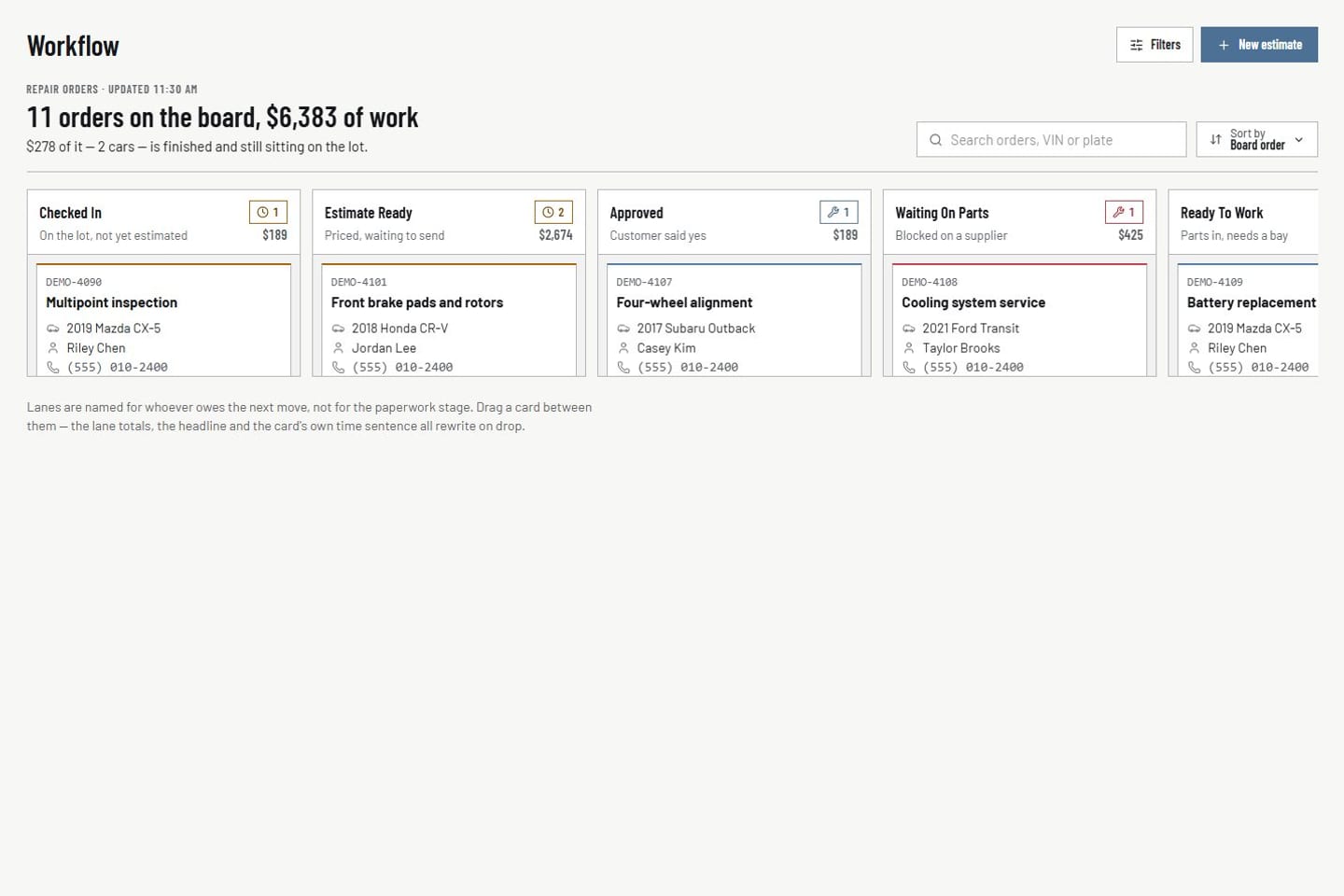
The board shows every active repair order by stage with customer, vehicle, value, and service lines on the card. Workflow statuses sync from Shopmonkey. Notes, next steps, and outcomes live in VehicleDesk.

  • Active repair orders by stage
  • Workflow statuses synced from Shopmonkey
  • Notes and outcomes on the card
Repair orders · Product screens shown with demo data.
VehicleDesk active repair-order board rendered with synthetic shop work

Parts costs

Parts costs land on the repair order that caused them.

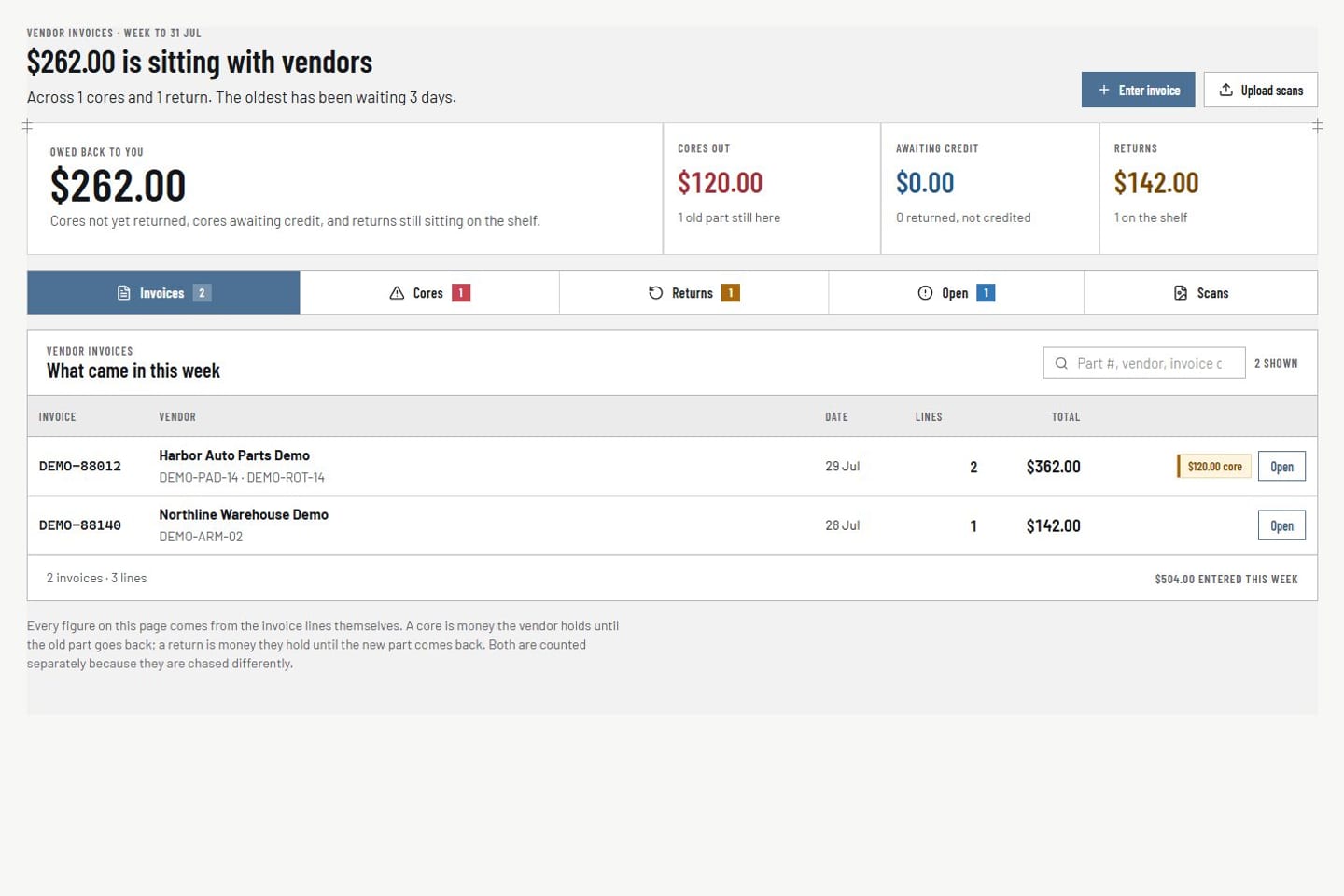
Vendor invoices, returns, cores, and credits attach to the synced repair order. Parts costs reconcile against what was billed at the weekly close.

  • Vendor invoices linked to the repair order
  • Returns, cores, and credits tracked separately
  • Reconciled at the weekly close
Parts and vendor costs · Product screens shown with demo data.
VehicleDesk parts workspace with synthetic vendor invoices, returns, cores, credits, and repair-order context

System of record

Each system does one job.

Shopmonkey stays the system of record for repair and financial records. VehicleDesk runs the shop's day on top of it.

What each system holds after a shop connects

Shopmonkey keeps

Repair and financial records

Customers, vehicles, repair orders, estimates, invoices, and payments live in Shopmonkey and sync into VehicleDesk.

  • Customers, vehicles, and repair orders
  • Estimates, invoices, and payments
  • Services, parts, labor, and tires
  • Workflow statuses
  • Not the operator of local recovery. Follow-ups run in VehicleDesk.

VehicleDesk runs

The shop's day

Everything the customer side of the shop needs runs here on the synced records.

  • Board, Today, and appointments
  • Follow-ups, deferred work, and consent-checked messaging
  • Vendor invoices, returns, cores, and credits
  • Weekly close and reporting

Sync coverage

What syncs, and where each record lives.

Every row follows the live sync. Appointments, follow-ups, and staff workflow are created in VehicleDesk on the synced customer and vehicle.

Sync coverage by record type

CapabilityWhat syncs into VehicleDeskSystem of record
CustomersImported customer record with contact details and historyShopmonkey source customer
VehiclesImported vehicle record with year, make, model, and mileageShopmonkey source vehicle
Services, parts, labor, and tiresImported from the order service endpoint, including parts, labor, and tiresShopmonkey source order lines
EstimatesImported estimate status and number on the repair orderShopmonkey source estimate
InvoicesImported invoice record with billed totalsShopmonkey source invoice
PaymentsImported payment record, live through webhooksShopmonkey source payment
InspectionsImported signed-event snapshots; not a full historical pullShopmonkey source inspection
AppointmentsCreated in VehicleDeskVehicleDesk local scheduling and request-to-book
Repair ordersImported repair-order context and workflow statusShopmonkey source repair order
Follow-up notes and tasksCreated in VehicleDeskVehicleDesk local state
Staff workflowCreated in VehicleDesk: notes, tasks, reminders, deferred and opportunity stateShopmonkey is not the operator of local recovery
CredentialsEncrypted server-side; never shown as proofProvider-owned secrets
Sync HealthFreshness, quota, and failure evidenceVehicleDesk operational record

Reliability

Built to stay current all day.

The connection is a production sync with call budgets, signed webhooks, distinct failure states, and freshness you read at a glance.

  • Continuous polling

    Scheduled jobs poll Shopmonkey on explicit call budgets. The sync stays inside the provider's limits and keeps running all day.

  • Signed webhooks

    Signed Shopmonkey events land in a queued, replay-safe path. A pump runs every five minutes to process events and hydrate the affected orders.

  • Freshness at a glance

    Sync Health shows last success, webhook state, and quota. Budget limits, provider errors, and stale data each show as their own state, so you always know the numbers are current.

  • Encrypted credentials

    API keys are provider-owned secrets. They stay server-side, encrypted, and destination-bound, and are never shown as proof. Rotating a key never exposes the stored value.

  • Guided setup

    A shop administrator authorizes access. VehicleDesk onboarding confirms scope, runs the first sync, and checks data quality before the team goes live.

  • Manual sync

    One click in Sync Health runs a sync on demand. The result and any warnings show on the same screen.

Book a demo

See the Shopmonkey connection live.

We connect a demo shop, show the sync land, and run the board it powers.